Polling And Streaming
Imagine you are building a chat application. Users expect messages to appear the moment they are sent, not five seconds later. The simplest approach is to keep asking the server “any new messages?” over and over, but that falls apart at scale. The real question is: how should the client learn about new data from the server? The answer depends on how fresh the data needs to be, how many clients you have, and which direction the communication flows. Two fundamental paradigms address this: polling and streaming.
Polling
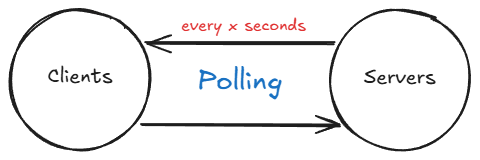
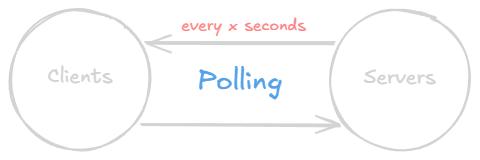
Polling is the process of gathering data at regular intervals. The client sends a request, gets a response, waits, and repeats. For instance, a system may be set up to request temperature data every ‘X’ seconds. This method has its utility, but it is not without its limitations.
Consider an online chat platform such as Facebook or WhatsApp, where instant messaging is paramount. In such scenarios, receiving messages after a certain time interval is not ideal. You could theoretically decrease the polling interval to as low as 0.1 second to simulate real-time communication, but this approach leads to significant load on the servers.
For a single client, issuing 10 requests per second might seem manageable. However, when you scale this to thousands or potentially even millions of users, each issuing 10 requests per second, it results in a tremendous load on the server. The vast majority of those responses will be empty, meaning “no new data.” That is pure waste.
This is where two improvements come in: holding the connection open longer (long polling) or keeping it open indefinitely (streaming).
Long Polling
Before jumping to fully persistent connections, it is worth understanding the middle ground. Long polling is an improvement over standard polling that significantly reduces unnecessary network traffic. In regular polling, the client sends a request and the server responds immediately, even if there is no new data, resulting in many empty responses. With long polling, the client sends a request and the server holds the connection open until new data becomes available or a predefined timeout is reached. Once the server responds (either with new data or a timeout), the client immediately issues a new request, and the cycle repeats.
This approach drastically reduces the number of round trips compared to frequent short polling while still providing near-real-time updates. Long polling was widely used before WebSockets became mainstream, and it remains a solid choice for systems where the infrastructure does not support persistent connections. However, long polling still has drawbacks: each held connection consumes server resources, and under high concurrency the number of open connections can become a bottleneck. If your infrastructure supports it, a true streaming approach is usually the better choice.
Streaming
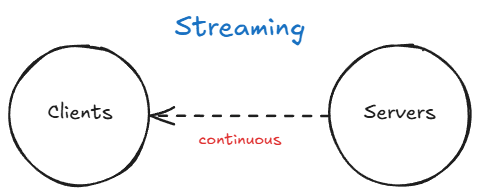
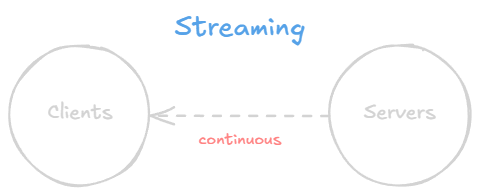
In the context of networking, streaming generally refers to continuously receiving a feed of information from a server by maintaining an open connection between the client and the server.
Streaming is achieved via sockets. A socket is an endpoint for communication between two machines over a network. Think of it as a file descriptor that your program can read from and write to, except the other end is a process on a remote machine. When a client opens a socket connection to a server, both sides can send and receive data over that connection for as long as it stays open. Neither side needs to re-establish the connection for each message, which eliminates the per-request overhead of HTTP polling.
Here is a minimal example showing a raw TCP socket connection in Java. This is not how you would build a production chat system, but it illustrates the core idea of reading from a persistent connection:
1
2
3
4
5
6
7
8
9
10
// Client: connect to a server and continuously read messages
try (Socket socket = new Socket("chat.example.com", 9000);
     BufferedReader reader = new BufferedReader(
         new InputStreamReader(socket.getInputStream()))) {

    String message;
    while ((message = reader.readLine()) != null) {
        System.out.println("Received: " + message);
    }
}
The connection stays open and the client reads messages as they arrive. No repeated HTTP requests, no empty responses, no wasted bandwidth. In practice, you would not use raw TCP sockets for web applications. Instead, two higher-level protocols sit on top of TCP and are designed for the web: WebSockets and Server-Sent Events.
WebSockets
WebSockets are the primary technology for full-duplex, bidirectional communication between a client and a server over a single, long-lived TCP connection. The connection starts as a standard HTTP request and is then upgraded to a WebSocket connection via a protocol handshake. Once established, both the client and the server can send messages to each other at any time without the overhead of HTTP headers on every message. This makes WebSockets ideal for use cases like chat applications, live dashboards, multiplayer games, and collaborative editing tools.
The handshake is worth understanding because it explains how WebSockets work with existing HTTP infrastructure. The client sends a regular HTTP request with an Upgrade header, and the server responds with a 101 Switching Protocols status if it agrees:
1
2
3
4
5
6
7
8
9
10
11
GET /chat HTTP/1.1
Host: chat.example.com
Upgrade: websocket
Connection: Upgrade
Sec-WebSocket-Key: dGhlIHNhbXBsZSBub25jZQ==
Sec-WebSocket-Version: 13

HTTP/1.1 101 Switching Protocols
Upgrade: websocket
Connection: Upgrade
Sec-WebSocket-Accept: s3pPLMBiTxaQ9kYGzzhZRbK+xOo=
After this handshake, the connection is no longer HTTP. It is a persistent, full-duplex WebSocket connection over the same TCP socket. Both sides can send frames at will.
Here is a Java example using Spring WebSocket that shows the server side of a simple chat endpoint:
1
2
3
4
5
6
7
8
9
10
11
12
13
14
15
16
17
18
19
20
21
22
23
24
25
26
27
28
29
30
31
32
33
34
35
36
37
@Configuration
@EnableWebSocket
public class WebSocketConfig implements WebSocketConfigurer {

    @Override
    public void registerWebSocketHandlers(WebSocketHandlerRegistry registry) {
        registry.addHandler(new ChatHandler(), "/chat");
    }
}

public class ChatHandler extends TextWebSocketHandler {

    private final Set<WebSocketSession> sessions =
        ConcurrentHashMap.newKeySet();

    @Override
    public void afterConnectionEstablished(WebSocketSession session) {
        sessions.add(session);
    }

    @Override
    protected void handleTextMessage(WebSocketSession session,
                                     TextMessage message) throws IOException {
        // Broadcast to all connected clients
        for (WebSocketSession s : sessions) {
            if (s.isOpen()) {
                s.sendMessage(message);
            }
        }
    }

    @Override
    public void afterConnectionClosed(WebSocketSession session,
                                      CloseStatus status) {
        sessions.remove(session);
    }
}
On the client side (in JavaScript), connecting is straightforward:
1
2
3
4
5
6
7
8
const ws = new WebSocket("ws://chat.example.com/chat");

ws.onopen = () => console.log("Connected");
ws.onmessage = (event) => console.log("Received:", event.data);
ws.onclose = () => console.log("Disconnected");

// Send a message
ws.send("Hello from the client");
Server-Sent Events (SSE)
Server-Sent Events (SSE) provide a simpler alternative to WebSockets when communication only needs to flow in one direction, from server to client. With SSE, the client opens a standard HTTP connection, and the server pushes updates through it as they become available. Because SSE uses plain HTTP, it works through proxies, load balancers, and firewalls without any special configuration, which is a significant operational advantage over WebSockets.
The browser natively supports SSE through the EventSource API, which also handles automatic reconnection if the connection drops. SSE works well for scenarios like live news feeds, stock tickers, and notification streams where the client does not need to send data back to the server over the same channel.
Here is a Spring controller that streams stock price updates via SSE:
1
2
3
4
5
6
7
8
9
10
11
12
13
14
15
16
17
@RestController
public class StockPriceController {

    @GetMapping(path = "/prices", produces = MediaType.TEXT_EVENT_STREAM_VALUE)
    public Flux<ServerSentEvent<String>> streamPrices() {
        return Flux.interval(Duration.ofSeconds(1))
            .map(seq -> ServerSentEvent.<String>builder()
                .id(String.valueOf(seq))
                .event("price-update")
                .data("{\"symbol\":\"AAPL\",\"price\":" + getPrice() + "}")
                .build());
    }

    private double getPrice() {
        return 150.0 + Math.random() * 10;
    }
}
And the client side using the EventSource API in JavaScript:
1
2
3
4
5
6
7
8
9
10
11
const source = new EventSource("/prices");

source.addEventListener("price-update", (event) => {
    const data = JSON.parse(event.data);
    console.log(`${data.symbol}: $${data.price.toFixed(2)}`);
});

source.onerror = () => {
    console.log("Connection lost, reconnecting...");
    // EventSource reconnects automatically
};
Notice that the client does not need to implement any reconnection logic. The EventSource API handles it automatically, resuming from the last received event ID. This is one of the biggest practical advantages of SSE over WebSockets, where reconnection and state recovery must be implemented manually.
Backpressure
One challenge that comes with streaming is backpressure: what happens when the server produces data faster than the client can consume it? With polling this is not a problem because the client controls the pace. With streaming, the server controls the pace, and a slow client can cause trouble.
If the server keeps writing to a connection that the client is not reading fast enough, the TCP send buffer fills up. At that point, one of three things happens depending on the implementation:
- The server blocks on the write call, which in a thread-per-connection model means one thread is stuck waiting. Under high concurrency, this can exhaust the thread pool.
- Messages are buffered in memory, which can cause the server to run out of heap space if the slow client never catches up.
- Messages are dropped, which is acceptable for some use cases (a live video feed can skip frames) but not for others (financial transactions must not be lost).
The practical solution depends on the protocol. With WebSockets, reactive frameworks like Spring WebFlux integrate backpressure through Project Reactor. The server can observe whether the client is keeping up and adjust accordingly. With SSE, the HTTP layer provides natural flow control through TCP windowing, but if messages are queued in the application layer before being written, the same memory concerns apply.
When designing a streaming system, it pays to think about what happens when a client is slow. Should the server buffer, drop, or disconnect? There is no universal answer, but ignoring the question entirely leads to outages under load.
When to Use What
Choosing the right approach depends on the nature of the communication your system requires:
Polling works best for simple use cases with low-frequency updates where near-real-time delivery is not critical. For example, checking for new email every 30 seconds or refreshing a dashboard periodically. It is the easiest to implement and works with any HTTP infrastructure.
Long polling suits scenarios with moderate real-time requirements where WebSocket support may not be available. It reduces wasted requests compared to regular polling and provides a reasonable approximation of push-based communication. It was the go-to technique for real-time web apps before WebSockets gained broad adoption.
Server-Sent Events (SSE) are a great fit when you only need the server to push updates to the client. They are simpler to set up than WebSockets, work over standard HTTP, and benefit from built-in browser reconnection logic. A live score feed or a deployment log stream are good examples.
WebSockets are the right choice when you need full-duplex, low-latency, bidirectional communication. Chat applications, real-time collaborative editors, and multiplayer games all benefit from the persistent, two-way channel that WebSockets provide. The trade-off is increased complexity in connection management, scaling (since each client holds an open connection), and handling reconnections gracefully.
Related posts: Network Protocols, Request-Response vs Publish-Subscribe