Load Balancing
A load balancer can be better understood through a simple use case. Consider a basic client-server architecture where a client sends requests to a server, which processes them and returns a response. Now, imagine the system expanding with multiple clients (two, three, four, and so on) sending requests to a single server. Clients might issue multiple requests as well.
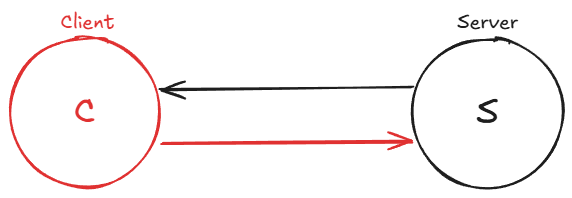
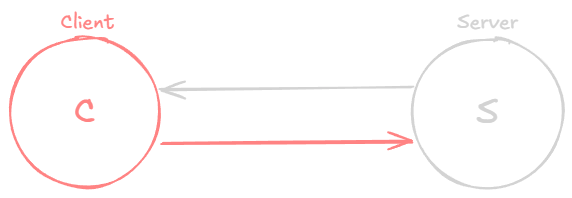
The single server has limited resources and can only handle a certain number of requests within a given time, thus limiting the system’s throughput. The more requests the server receives from various clients, the more likely it is to become overloaded, potentially leading to system failure or slow performance.
To address this issue, the system needs to be scaled. There are two ways to accomplish this:
Vertical scaling involves increasing the server’s power and performance. However, there are hard physical limits to how far this approach can go. As of today, the largest single-socket commodity servers max out at around 128 to 256 cores and roughly 6 to 12 TB of RAM. Beyond that, you are looking at specialized, extremely expensive hardware with diminishing returns. At some point, doubling the cost of a machine no longer doubles its capacity.
Horizontal scaling means adding more servers or machines to the system. For example, if we have four servers, the system can now handle requests from clients in a balanced way. Assuming that all servers have equal resources and power, the system can handle four times the load it could previously manage with only one server. This assumes that all clients distribute their requests evenly among the servers.
The challenge is determining how clients know which server to send their requests to. This is where load balancers come into play.
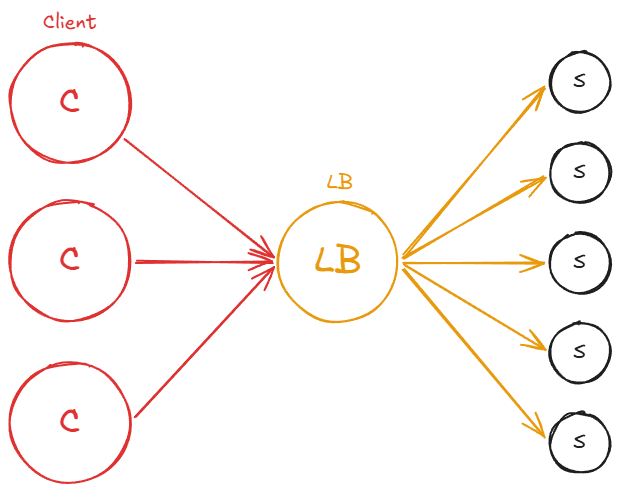
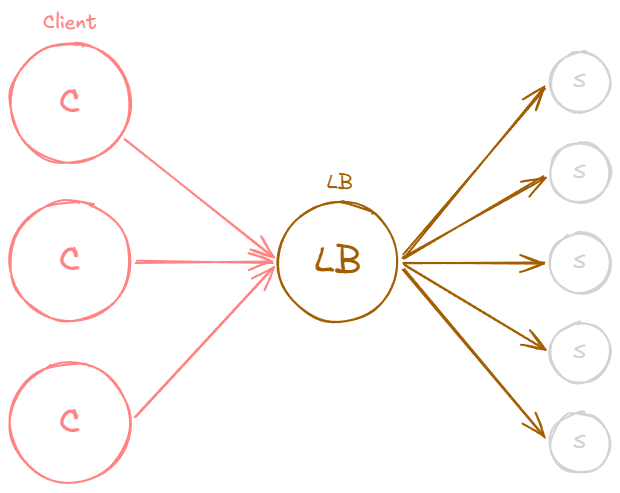
A load balancer is a server that sits between a group of clients and a set of servers (at least in our example), with the primary responsibility of distributing workloads across resources. In this case, it balances or reroutes traffic from clients to servers in a balanced or preconfigured manner.
In a system with a load balancer, clients issue requests that are directed to the load balancer. The load balancer’s job is to redirect these requests to the servers in a balanced manner. This results in traffic being evenly distributed across all the servers, allowing for effective horizontal scaling.
Load balancers are highly beneficial as they prevent resources, such as single or multiple servers, from becoming overloaded. They also enhance the overall system throughput, as the servers can respond to requests faster without being bogged down. Consequently, this leads to better latencies and more efficient use of resources. As new servers are added to the system, the load balancer distributes traffic to these new resources, ensuring optimal performance.
Often, load balancers can be considered a type of reverse proxy, as they sit between clients and servers and typically act on behalf of the servers.
Load balancing can occur at various points within a system. For example, a load balancer might be placed between clients and servers, between servers and databases, or even at the DNS layer when dealing with websites.
Layer 4 vs Layer 7 Load Balancing
Load balancers operate at different layers of the OSI model, and the layer at which they operate determines what information they can use to make routing decisions:
Layer 4 (Transport layer) load balancers make routing decisions based on TCP/UDP connection data, specifically the source and destination IP addresses and port numbers. They do not inspect the contents of the packets. Because they work at a lower level, Layer 4 load balancers are extremely fast and efficient, but they cannot make decisions based on application-level details like URL paths, HTTP headers, or cookies.
Layer 7 (Application layer) load balancers inspect the full content of HTTP requests, including the URL path, headers, cookies, and even the request body. This allows for much more intelligent routing. For example, a Layer 7 load balancer can route all
/apirequests to one pool of servers and all/staticrequests to another. It can also perform SSL termination, header manipulation, and content-based health checks. The trade-off is that Layer 7 load balancing requires more processing power since each request must be fully parsed.
In practice, many architectures use both: a Layer 4 load balancer at the edge for raw performance and a Layer 7 load balancer behind it for application-aware routing.
Health Checks
A load balancer must know which backend servers are healthy and able to serve traffic. To determine this, load balancers perform health checks, periodic probes sent to each server to verify that it is responsive and functioning correctly.
Health checks can be as simple as a TCP connection attempt (verifying the server is listening on the expected port) or as thorough as an HTTP request to a dedicated health endpoint (e.g., GET /health) that verifies the application is running, database connections are active, and downstream dependencies are reachable.
If a server fails a configurable number of consecutive health checks, the load balancer marks it as unhealthy and stops routing new traffic to it. Once the server begins passing health checks again, the load balancer reintroduces it into the rotation. This mechanism is essential for maintaining system availability, as it ensures that clients are never routed to a server that cannot serve their requests.
Server-Selection Strategy
A load balancer uses a server-selection strategy to decide how to distribute traffic among multiple servers.
Firstly it’s essential to recognize that there are different types of load balancers, such as software load balancers and hardware load balancers.
Hardware load balancers are physical machines dedicated to load balancing. In contrast, software load balancers offer more customization and scaling options. Hardware load balancers are limited by their given hardware, which can be expensive. For this discussion, we will focus on software load balancers and the techniques they use to distribute traffic to servers.
Software load balancers use various algorithms to distribute incoming client requests across multiple servers. Some common load balancing methods include:
Round Robin: In this method, requests are distributed sequentially and cyclically among the available servers. The load balancer starts with the first server, moves through the list to the last server, and then goes back to the first server, continuing this pattern for subsequent requests. Round Robin works well when servers have similar capacities. This is the default strategy in most load balancers, including Nginx and HAProxy.
Weighted Round Robin: An extension of the Round Robin method is the Weighted Round Robin, where each server is assigned a weight based on its capacity or performance. The load balancer distributes requests according to these weights while still following the sequential and cyclical order. Servers with higher weights receive more requests, ensuring that the distribution takes into account the varying capabilities of the servers. This method offers a more balanced approach when server capacities differ significantly.
Least Connections: The load balancer routes each new request to the server currently handling the fewest active connections. This is particularly useful when requests vary widely in processing time. A simple round robin might pile up long-running requests on one server while another sits idle, but least connections naturally adapts to uneven workloads.
Performance-Based: In a performance-based approach, the load balancer continuously monitors the performance of the available servers and distributes incoming requests based on each server’s current performance metrics. The load balancer may consider factors such as CPU usage, memory usage, network latency, or how much traffic a server is handling at any given time when making its decision.
IP Hash: The client’s IP address is used to determine which server will handle the request. This method ensures that a specific client will always connect to the same server, as long as the server is available. The IP hash technique is particularly useful when servers cache the results of requests. Because the same clients consistently connect to the same servers, cache hits are maximized, leading to improved performance and reduced latency.
Path-Based: The URL path or specific segments of a request’s path are used to determine which server will handle the request. This method allows for efficient distribution of traffic among multiple servers based on the type of content or service being requested. Path-based routing is a Layer 7 strategy since it requires inspecting the HTTP request.
These and more techniques help ensure that incoming requests are evenly distributed among the available servers, reducing the likelihood of overloading any single server and maintaining optimal system performance.
When you’re going to be designing systems, you’re going to want to pick server selection strategies according to your use case. An interesting thing about all of this is that when you’re designing a system, it might actually make sense to have multiple load balancers that use different server selection strategies.
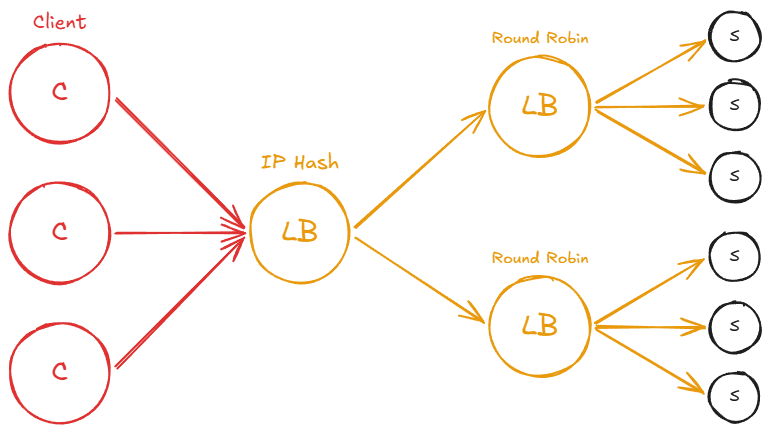
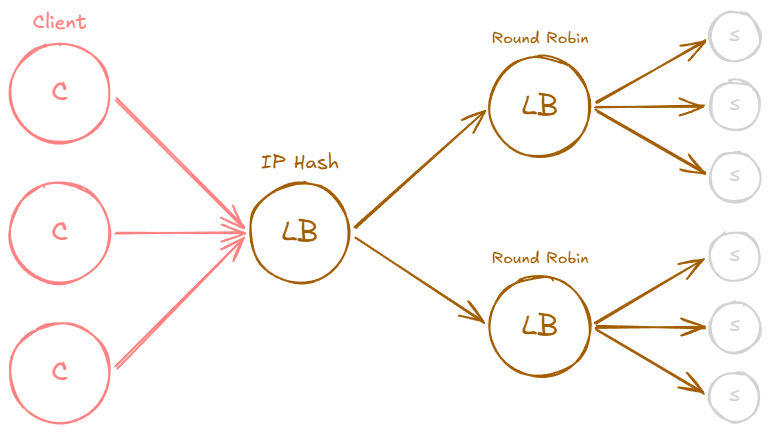
For example, clients may hit a load balancer, which will distribute the load using IP hash selection strategy to the next load balancers which might use Round Robin strategy.
Example: Nginx Round-Robin Configuration
To make this more concrete, here is a minimal Nginx configuration that load balances across three backend servers using round robin (the default strategy):
1
2
3
4
5
6
7
8
9
10
11
12
13
14
15
upstream backend {
    server 10.0.0.1:8080;
    server 10.0.0.2:8080;
    server 10.0.0.3:8080;
}

server {
    listen 80;

    location / {
        proxy_pass http://backend;
        proxy_set_header Host $host;
        proxy_set_header X-Real-IP $remote_addr;
    }
}
Switching to weighted round robin is as simple as adding weight parameters:
1
2
3
4
5
upstream backend {
    server 10.0.0.1:8080 weight=5;   # receives 5x the traffic
    server 10.0.0.2:8080 weight=3;
    server 10.0.0.3:8080 weight=1;
}
And to use IP hash for session affinity:
1
2
3
4
5
6
upstream backend {
    ip_hash;
    server 10.0.0.1:8080;
    server 10.0.0.2:8080;
    server 10.0.0.3:8080;
}
Most production load balancers (Nginx, HAProxy, AWS ALB, Envoy) support these strategies and more through straightforward configuration. The point is that switching between strategies is typically a configuration change, not a code change.
Sticky Sessions
Some applications store session state on the server side, for example in-memory shopping carts, authentication tokens, or multi-step form wizards. When a load balancer distributes requests from the same user to different servers, that session state is lost. The user might add items to a cart on server A, but the next request lands on server B which knows nothing about it.
Sticky sessions (also called session persistence or session affinity) solve this by ensuring all requests from a given client are routed to the same backend server for the duration of their session. There are several common mechanisms:
Cookie-based: The load balancer inserts a cookie (e.g.,
SERVERID=backend1) into the response. On subsequent requests, the load balancer reads this cookie and routes accordingly. This is the most common approach and works well with Layer 7 load balancers.IP-based: Uses the client’s IP address to pin them to a server. This is simpler but breaks when clients share an IP (corporate NATs, mobile carrier-grade NAT) or when their IP changes (switching from WiFi to cellular).
Application-controlled: The application itself includes a server identifier in a URL parameter or custom header, and the load balancer uses it for routing decisions.
It is worth noting that sticky sessions come with real trade-offs. They can create uneven load distribution because some users generate far more traffic than others, and those heavy users are “stuck” to one server. They also reduce availability: if the pinned server goes down, the user loses their session entirely. For these reasons, the better long-term solution is usually to externalize session state into a shared store like Redis or a database, making every server capable of handling any user’s request. Sticky sessions are then unnecessary.
I have seen teams reach for sticky sessions as a quick fix for stateful applications, only to regret it later when they need to scale or do rolling deployments. If you can design your application to be stateless from the start, you will have a much easier time.
Connection Draining
When you need to take a server out of rotation, whether for a deployment, maintenance, or because it is failing, simply cutting off all traffic immediately can cause problems. In-flight requests get terminated mid-response, users see errors, and long-running operations (file uploads, database transactions, report generation) are interrupted.
Connection draining (sometimes called graceful shutdown or deregistration delay) addresses this by giving the server time to finish processing its active requests before it stops receiving new ones. The process works like this:
- The load balancer marks the server as “draining” and stops sending new requests to it.
- Existing connections and in-flight requests continue to be processed normally.
- After a configurable timeout (typically 30 to 300 seconds), any remaining connections are closed.
- The server is fully removed from the pool and can be safely shut down or redeployed.
This mechanism is essential for zero-downtime deployments. During a rolling update, each server goes through the drain phase before being updated, ensuring that no client requests are dropped. Most production load balancers support this natively. In AWS, for example, the ALB’s “deregistration delay” defaults to 300 seconds. In Kubernetes, the terminationGracePeriodSeconds on a pod serves a similar purpose, giving the application time to finish work before the container is killed.
Without connection draining, rolling deployments can cause a noticeable spike in error rates every time you push a new version, which defeats much of the purpose of having a load balancer in the first place.
Hot Spot
Even with a load balancer in place, perfectly even traffic distribution is not always achievable. When distributing a workload across a set of servers, the workload might be allocated unevenly. This imbalance can occur if your sharding key or hashing function is suboptimal, or if the workload is inherently skewed. As a result, some servers may experience significantly higher traffic than others, leading to the creation of “hot spots.”
Related posts: Latency And Throughput, Availability, Hashing, Caching, Proxies