CQRS: Command Query Responsibility Segregation
You open the admin dashboard to check yesterday’s sales. You click “Top Selling Products Last 30 Days” and wait. Five seconds pass. Ten seconds. Thirty seconds. After 45 seconds, the report finally appears. Meanwhile, customers are checking out in under a second. Same system, wildly different performance.
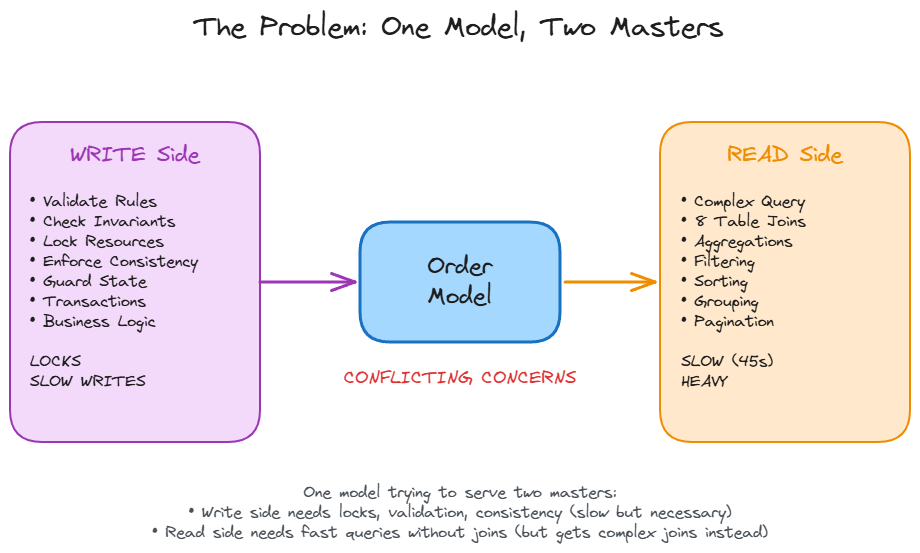
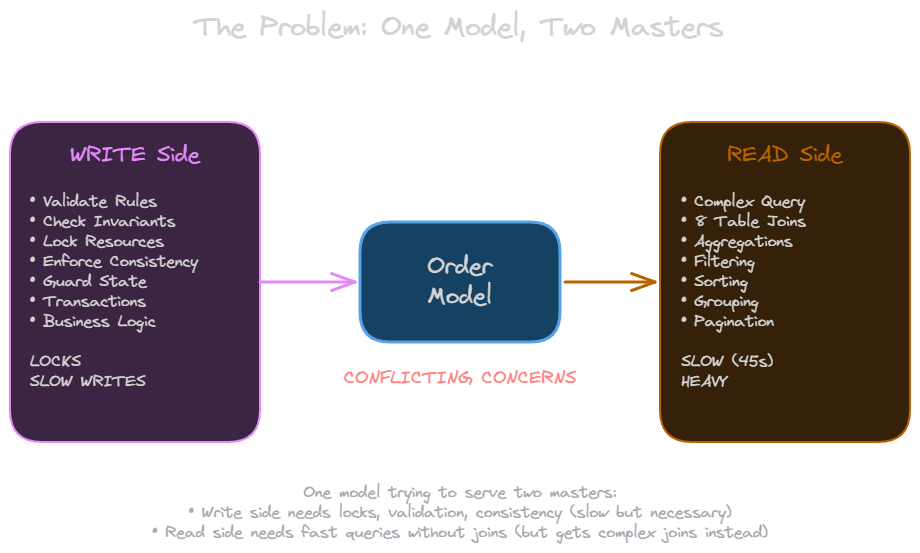
The problem is not the database or the query optimizer. The problem is that your Order model is trying to serve two masters. On the write side, it enforces business rules, maintains consistency, and locks resources during transactions. On the read side, it joins eight tables (orders, order_items, products, categories, users, payments, inventory, reviews) to build that sales report. One model doing everything means it does nothing well.
The Core Idea
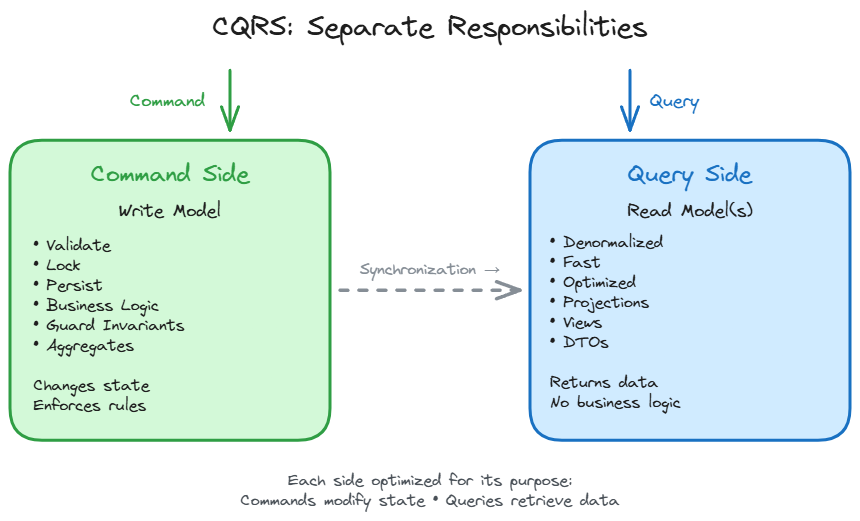
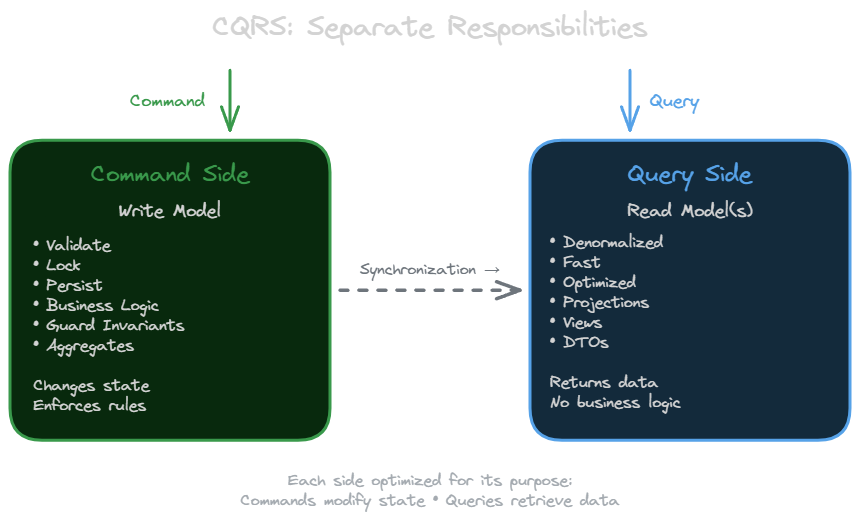
CQRS (Command Query Responsibility Segregation) splits this model in two. The write model enforces business rules, maintains invariants, and protects consistency. The read model optimizes for queries. No joins needed, no business logic, just data shaped for retrieval.
Bertrand Meyer said it best: “Asking a question should not change the answer.” Commands change state. Queries return data. They have fundamentally different concerns, so they should have different models.
From CQS to CQRS
The idea goes back to 1988, when Bertrand Meyer introduced Command Query Separation (CQS). He divided methods into two categories: commands that change state but return nothing, and queries that return values but change nothing. You probably do this naturally. Nobody writes a getCount() method that increments a counter as a side effect. Right?
In 2010, Greg Young took this object-level principle and applied it architecturally. He added the “R” (Responsibility) and changed the “S” from Separation to Segregation. The result: two separate models, not just two types of methods. Your write model lives in one place with its business rules. Your read model lives somewhere else, optimized for queries.
The Event Sourcing Myth
Stop me if you have heard this before: “CQRS requires event sourcing.” Wrong. CQRS is often used with event sourcing because they fit together naturally. Events make excellent building blocks for read models. But you do not need event sourcing to implement CQRS. The four levels of adoption I will show you in a moment prove this. Levels 1 through 3 use traditional databases with standard persistence. Event sourcing is chosen for CQRS, not the reverse.
Why Separate Models
Two reasons: separation of concerns and performance.
Separation of Concerns
Your write model is complex. It guards invariants, enforces business rules, and validates state transitions. Do you really want to expose that internal structure just so someone can display a list?
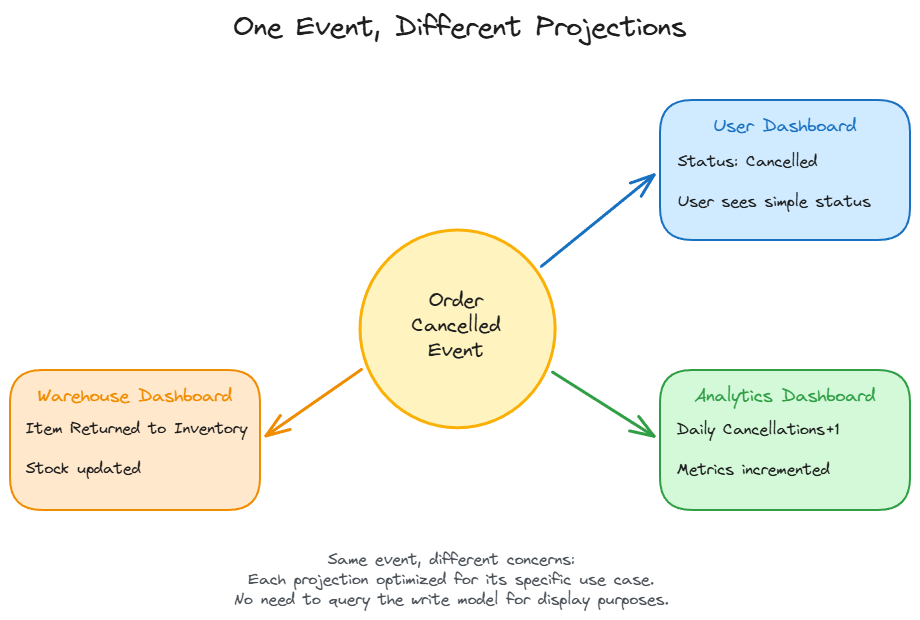
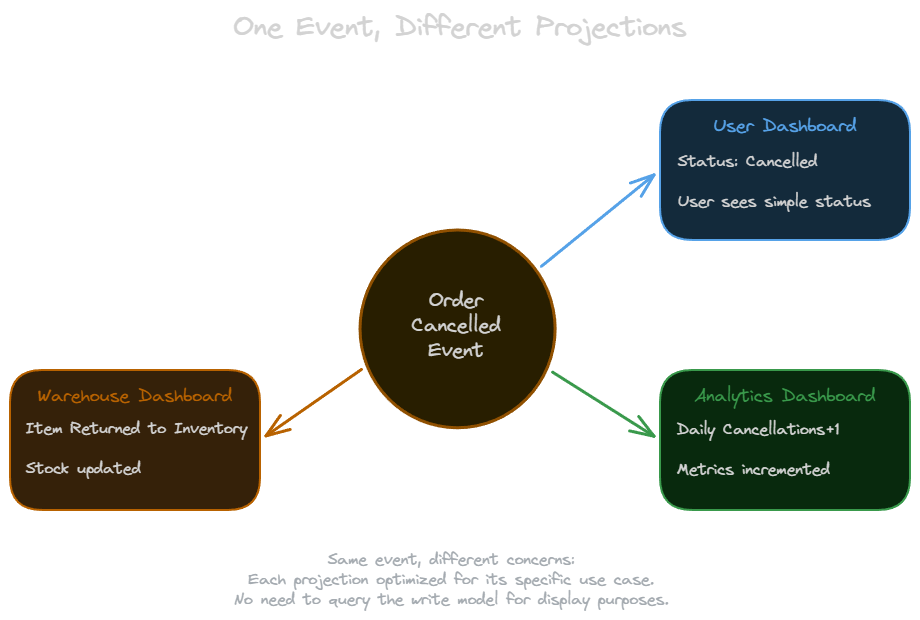
Read models can be tailored to specific needs. When a user cancels an order, three different systems care about different aspects of that event. The user’s order history shows “Cancelled” status. The analytics dashboard increments daily cancellations by one. The warehouse dashboard updates “items returned to inventory.” Same event, three different projections.
Performance
Most systems read far more than they write. Often 100:1 or higher. The write model needs transactions, locks, and consistency guarantees. The read model can be denormalized, cached, and indexed differently. You can optimize each side independently.
Before CQRS, that dashboard query joins eight tables and takes 45 seconds. After CQRS with a denormalized read table (Level 3, explained next), the same query takes 0.2 seconds. The write path (checkout) stays unchanged, but the read path is 225 times faster.
Four Levels of Adoption
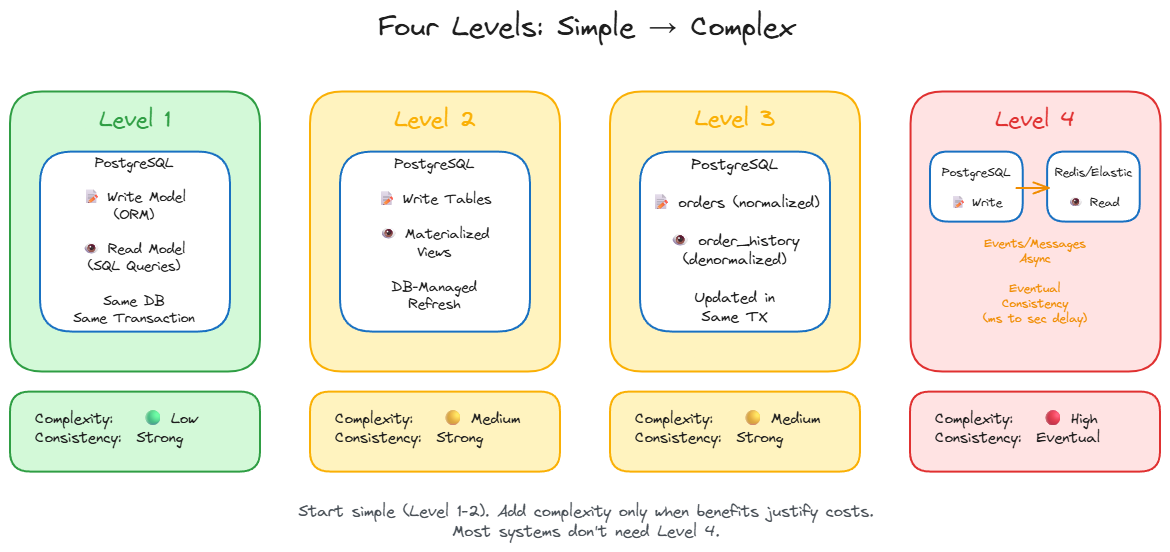
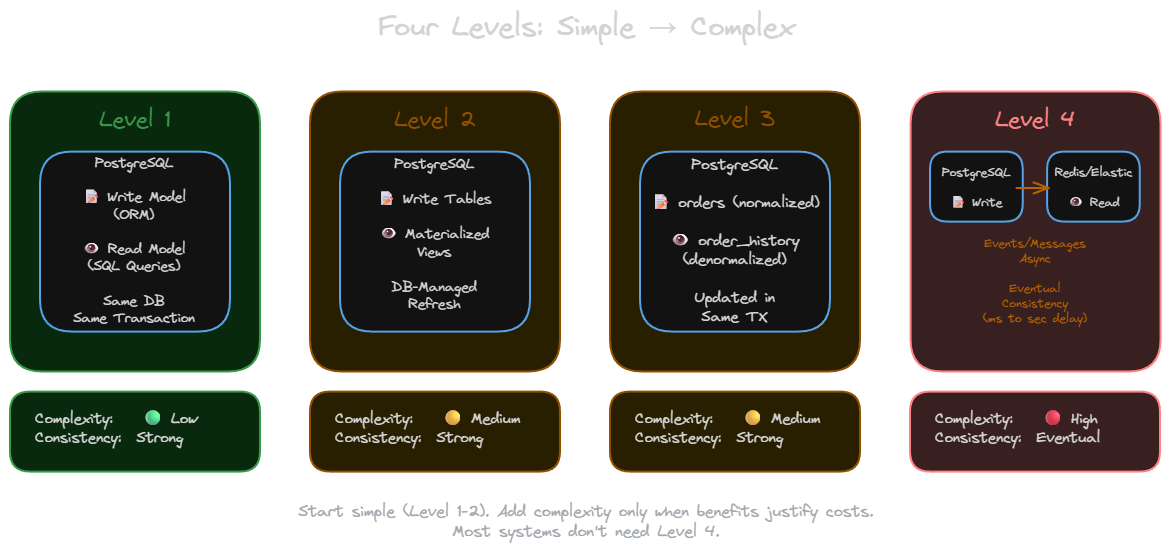
You do not need to jump straight to distributed systems and eventual consistency. Start simple and add complexity only when needed.
Level 1: Separate Read Models, Same Database
Keep your ORM entities for writes. Create separate DTO or projection classes for reads using SQL queries. Same database, still joins, but responsibilities are separated. You gain cleaner code. Performance improves minimally, but the architecture becomes more maintainable.
Level 2: Materialized Views
Use database-maintained materialized views as read models. The database handles refreshing them. You gain separation plus some performance improvement. The trade-off: materialized views are database-specific features, so you are tied to your database vendor’s implementation.
Level 3: Dedicated Read Tables
Create a separate denormalized table specifically for reads. Update it in the same transaction as your write. For example, maintain an orders table (normalized) and an order_history_view table (denormalized for the user dashboard). You get real performance improvements while keeping transactional consistency. This is the sweet spot for many applications.
Level 4: Different Technologies and Eventual Consistency
The write model lives in PostgreSQL. The read model lives in Redis, Elasticsearch, or another technology optimized for your read patterns. Updates flow via a message queue (Kafka, RabbitMQ) or Change Data Capture (CDC like Debezium). The write model publishes events after successful commits. The read model subscribes and updates asynchronously.
If a read model update fails, messages retry automatically. Poison messages go to a dead letter queue for investigation. The typical consistency window is milliseconds to seconds. Users may see stale data briefly after writes.
You gain optimal technology per use case and independent scaling. You pay with eventual consistency, increased complexity, and the need to handle asynchronous failures.
Technology selection guide for Level 4 read models:
- Redis: Sub-millisecond reads, data fits in memory, TTL-based expiration (session data, leaderboards)
- Elasticsearch: Full-text search, complex aggregations, faceted navigation (product catalogs, log analysis)
- MongoDB: Flexible schema, document-based queries, geospatial data (user profiles, location features)
- Separate PostgreSQL: Relational reads with different schema, read replicas (reporting databases)
A Practical Example
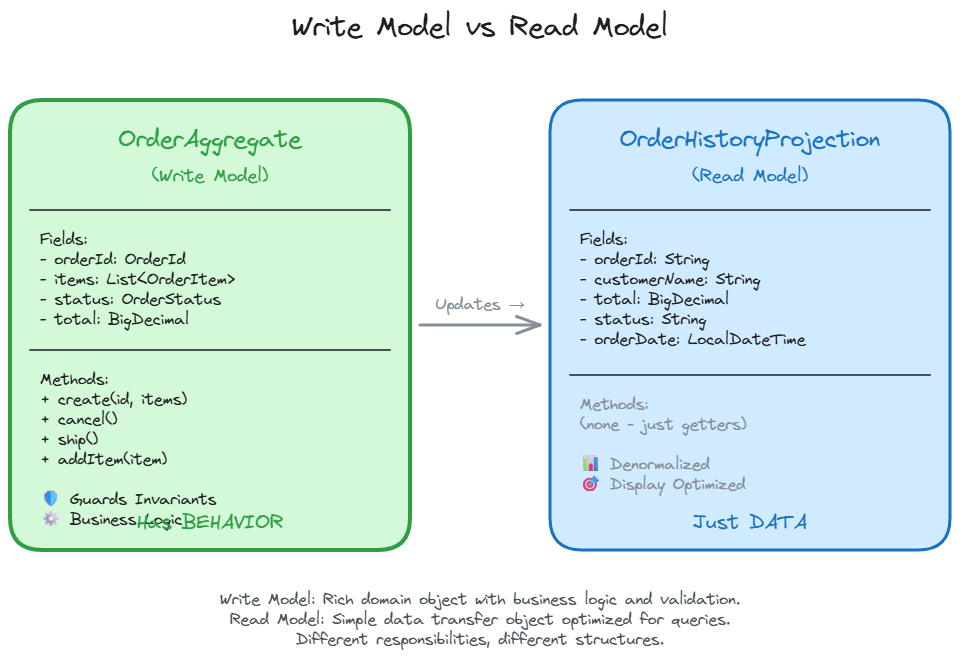
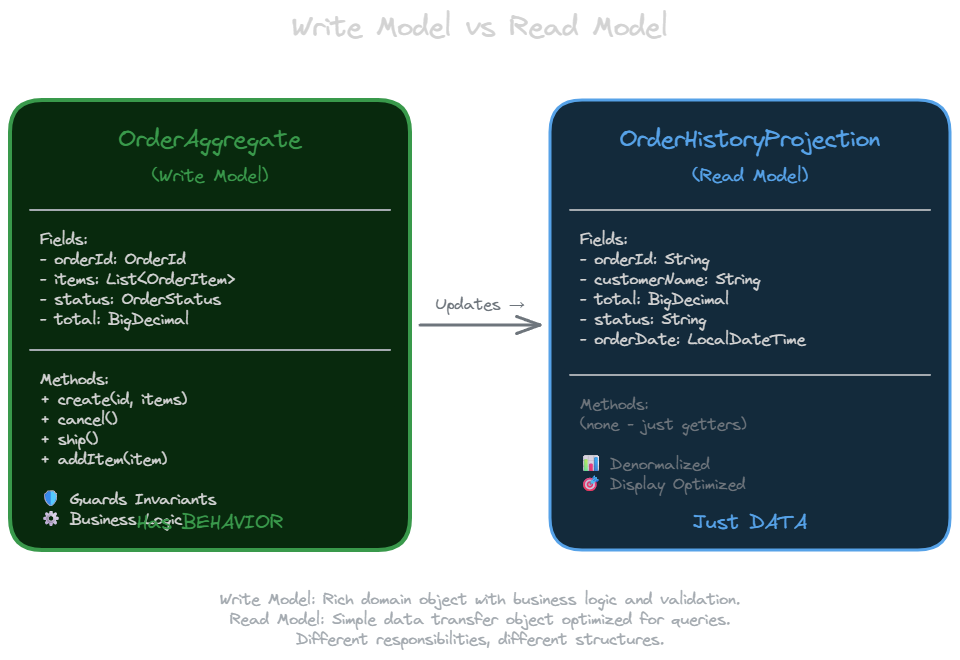
Here is an order management system. The write model enforces business rules. The read model optimizes for display.
Write Model:
1
2
3
4
5
6
7
8
9
10
11
12
13
14
15
16
17
18
19
20
21
22
23
24
25
26
27
28
29
30
31
32
33
34
35
36
37
38
39
40
41
42
// OrderAggregate - enforces business rules
class OrderAggregate {
    private OrderId id;
    private List<OrderItem> items;
    private OrderStatus status;

    private OrderAggregate(OrderId id, List<OrderItem> items, OrderStatus status) {
        this.id = id;
        this.items = items;
        this.status = status;
    }

    static OrderAggregate create(OrderId id, List<OrderItem> items) {
        if (items.isEmpty()) {
            throw new IllegalArgumentException("Order must have at least one item");
        }
        // Business rule: minimum order value
        BigDecimal total = items.stream()
            .map(OrderItem::getPrice)
            .reduce(BigDecimal.ZERO, BigDecimal::add);
        if (total.compareTo(new BigDecimal("10.00")) < 0) {
            throw new IllegalArgumentException("Minimum order value is $10.00");
        }
        return new OrderAggregate(id, items, OrderStatus.PENDING);
    }

    void cancel() {
        if (status == SHIPPED) {
            throw new IllegalStateException("Cannot cancel shipped order");
        }
        this.status = CANCELLED;
        // emit OrderCancelled event
    }

    void ship() {
        if (status != OrderStatus.PENDING) {
            throw new IllegalStateException("Can only ship pending orders");
        }
        this.status = OrderStatus.SHIPPED;
        // emit OrderShipped event
    }
}
Read Model:
1
2
3
4
5
6
7
8
9
10
11
12
13
14
15
16
17
18
19
20
21
22
23
24
25
26
27
28
29
30
31
32
33
// OrderHistoryProjection - optimized for display
class OrderHistoryProjection {
    String orderId;
    String customerName;
    BigDecimal total;
    String status;
    LocalDateTime orderDate;

    // Just data, no behavior - getters only
    public String getOrderId() { return orderId; }
    public String getCustomerName() { return customerName; }
    public BigDecimal getTotal() { return total; }
    public String getStatus() { return status; }
    public LocalDateTime getOrderDate() { return orderDate; }
}

// Repository - handles read queries
interface OrderHistoryRepository {
    @Query("SELECT order_id, customer_name, total, status, order_date " +
           "FROM order_history_view WHERE customer_id = ?")
    List<OrderHistoryProjection> findByCustomerId(String customerId);

    @Query("SELECT order_id, customer_name, total, status, order_date " +
           "FROM order_history_view WHERE order_date >= ? ORDER BY order_date DESC")
    List<OrderHistoryProjection> findRecentOrders(LocalDateTime since);
}

// Usage in controller
@GetMapping("/my-orders")
List<OrderHistoryProjection> getMyOrders(@AuthenticatedUser String customerId) {
    return orderHistoryRepository.findByCustomerId(customerId);
    // Fast query: no joins, reads from denormalized view
}
The write model has behavior. Methods like create(), cancel(), and ship() enforce business rules and guard invariants. The read model is just data. Simple queries against a denormalized view. No business logic, no validation, just retrieval.
When to Use CQRS
Look for these patterns in your system.
Scenario 1: E-commerce Order History
The write side (checkout) is simple. Validate payment, create order record. Fast. The read side (customer views order history) is complex. Join orders, order items, products, images, shipping status, and reviews. Slow.
Apply Level 2 or 3 CQRS. Create a denormalized order_history_view table with all data pre-joined. Queries become simple selects with no joins.
Scenario 2: Analytics Dashboard
The write side (user events) is high-volume but simple. Log clicks, page views, purchases. Fast inserts. The read side (dashboard) requires heavy aggregations. Time-series charts, cohort analysis, funnel metrics. Slow queries.
Apply Level 3 or 4 CQRS. Put the read model in Elasticsearch for fast aggregations and time-series queries.
General signals:
- Slow queries with complex joins while writes are fast
- Reporting or dashboards requiring heavy aggregations
- Complex write model with business rules that should not be exposed for reads
- Read-heavy systems (100:1 or higher read to write ratio)
When NOT to Use CQRS
Martin Fowler warns: “The majority of cases I have run into have not been so good, with CQRS seen as a significant force for getting a software system into serious difficulties.”
Avoid CQRS when:
- You are building CRUD applications (simple create, read, update, delete operations)
- Reads and writes have similar complexity
- You are tempted to apply it to entire systems (use it only in specific bounded contexts)
- Your team is unfamiliar with eventual consistency (and you need Level 4)
- You are doing premature optimization
CQRS adds complexity. If your unified model works fine, keep it. Do not fix what is not broken.
Starting Small
Do not rewrite everything. Identify one bottleneck. That slow report. That heavy dashboard. Apply Level 1 or 2. Measure the improvement. If it helps, expand gradually. If you need Level 3, implement it carefully. Move to Level 4 only when you truly need a different technology for reads.
The pattern is simple. Separate reads from writes. Start with the simplest implementation that solves your problem. Add complexity only when the benefits clearly outweigh the costs.
Related posts: Latency and Throughput