Concurrency, Threading and Parallelism
Concurrency and parallelism are often confused, but they describe fundamentally different things. Parallelism is about doing multiple things at the same time. Concurrency is about structuring a program to deal with multiple things at once, even if only one actually runs at any given moment.
“Concurrency is about dealing with lots of things at once. Parallelism is about doing lots of things at once.”
Rob Pike, Concurrency Is Not Parallelism
Processes and Threads
A process is a running program with its own isolated memory space. The operating system keeps processes separated from each other, so one process cannot directly read or write another’s memory.
A thread is a unit of execution within a process. Multiple threads within the same process share the same memory space, which makes communication between them fast but also introduces the risk of data corruption when two threads modify the same data simultaneously.
Every Java application starts with a single thread (the main thread) and can create additional threads as needed.
Parallelism
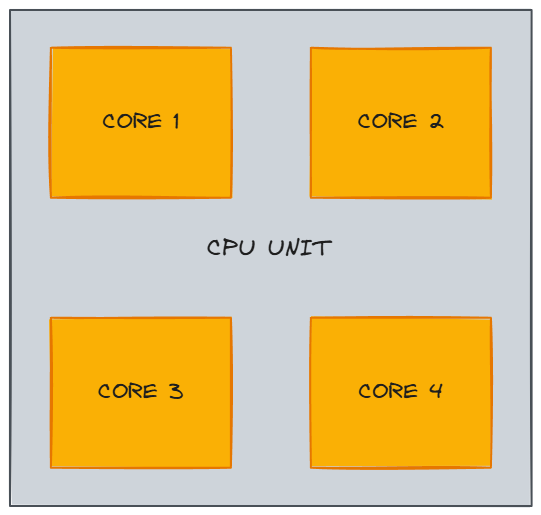
Parallelism means that multiple operations genuinely run at the same time on separate CPU cores. A processor with four cores can execute four threads truly simultaneously. Each core runs at a certain clock speed (e.g., 2.6 GHz means 2.6 billion clock cycles per second), which determines how quickly it processes instructions.
Modern CPUs often support hyper-threading (SMT), which allows each physical core to handle two hardware threads. This can improve throughput for certain workloads, but it is not the same as having twice the cores. True parallelism is still limited by the number of physical cores.
Hyper-threading helps most with workloads that have frequent cache misses or I/O waits. When one hardware thread stalls (waiting for data from main memory, for example), the sibling thread can use the execution units that would otherwise sit idle. For CPU-bound workloads that already keep the execution units fully utilized, hyper-threading provides minimal benefit because there are no idle cycles for the sibling thread to fill.
Concurrency
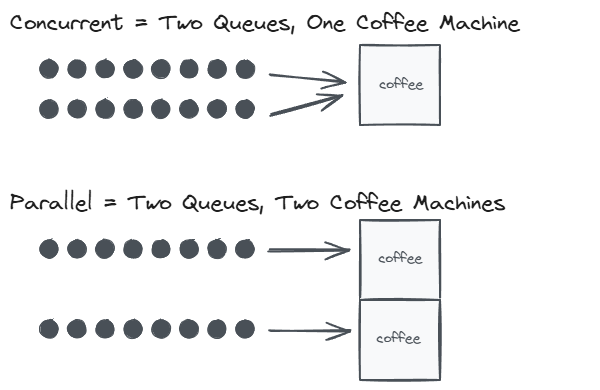
Concurrency means structuring work so that multiple threads can make progress, even if they don’t run simultaneously. On a single core, the operating system’s scheduler switches between threads rapidly, a process called context switching. Each thread gets a time slice, and the switching happens so fast that it creates the illusion of simultaneous execution.
A thread might also voluntarily yield the CPU by sleeping, waiting for I/O, or blocking on a lock. When that happens, the scheduler picks another runnable thread to fill the gap.
Here is a simplified view of how a scheduler might interleave two threads on a single core:
1
2
3
4
5
6
7
8
Time   Core 1           Event
────   ───────────────   ──────────────────────────────
 t0    Thread A: work    A starts running
 t1    Thread B: work    A blocks on I/O, scheduler picks B
 t2    Thread A: work    B blocks on I/O, scheduler picks A
 t3    Thread B: work    A blocks again, scheduler picks B
 t4    Thread A: done    A gets CPU back, finishes
 t5    Thread B: done    B gets CPU back, finishes
Neither thread ran in parallel. They shared the same core. But because the scheduler interleaved their execution, both made progress. This is the essence of concurrency.
Concurrency in Java
In Java, creating and running threads looks like this:
1
2
3
4
5
6
7
8
9
10
11
12
13
14
15
16
17
18
19
20
21
22
23
24
25
26
27
28
29
public class ConcurrencyExample {

    public static void main(String[] args) {
        Thread threadA = new Thread(() -> {
            for (int i = 0; i < 5; i++) {
                System.out.println("Thread A - step " + i);
                sleep(100);
            }
        });

        Thread threadB = new Thread(() -> {
            for (int i = 0; i < 5; i++) {
                System.out.println("Thread B - step " + i);
                sleep(100);
            }
        });

        threadA.start();
        threadB.start();
    }

    private static void sleep(long millis) {
        try {
            Thread.sleep(millis);
        } catch (InterruptedException e) {
            Thread.currentThread().interrupt();
        }
    }
}
Thread.sleep throws a checked InterruptedException, so it must be wrapped in a try-catch. The helper method keeps the thread lambdas readable. Even on a single core, the output of Thread A and Thread B will interleave because the scheduler switches between them whenever one sleeps.
In practice, creating threads directly with new Thread() is rarely the right approach. Threads are expensive to create and destroy, and uncontrolled thread creation can exhaust system resources. The java.util.concurrent package provides ExecutorService, which manages a pool of reusable threads:
1
2
3
4
5
6
7
8
9
10
11
12
13
14
15
16
17
18
19
20
21
22
23
24
25
26
27
28
29
30
31
32
33
34
35
import java.util.concurrent.ExecutorService;
import java.util.concurrent.Executors;
import java.util.concurrent.TimeUnit;

public class ExecutorServiceExample {

    public static void main(String[] args) throws InterruptedException {
        ExecutorService executor = Executors.newFixedThreadPool(2);

        executor.submit(() -> {
            for (int i = 0; i < 5; i++) {
                System.out.println("Task A - step " + i);
                sleep(100);
            }
        });

        executor.submit(() -> {
            for (int i = 0; i < 5; i++) {
                System.out.println("Task B - step " + i);
                sleep(100);
            }
        });

        executor.shutdown();
        executor.awaitTermination(5, TimeUnit.SECONDS);
    }

    private static void sleep(long millis) {
        try {
            Thread.sleep(millis);
        } catch (InterruptedException e) {
            Thread.currentThread().interrupt();
        }
    }
}
newFixedThreadPool(2) creates a pool with two threads. Tasks submitted via submit() are queued and executed by whichever thread is available. Calling shutdown() stops the pool from accepting new tasks, and awaitTermination() blocks until all submitted tasks finish.
Common Concurrency Hazards
Working with multiple threads introduces several well-known hazards.
Race Condition
Two or more threads access shared mutable state at the same time, and the outcome depends on the order of execution. In this example, two threads each increment a shared counter 10,000 times. Without synchronization, increments get lost because counter++ is not atomic (it reads, adds, then writes):
1
2
3
4
5
6
7
8
9
10
11
12
13
14
15
16
17
18
19
20
21
22
23
24
25
26
public class RaceConditionExample {

    private static int counter = 0;

    public static void main(String[] args) throws InterruptedException {
        Thread t1 = new Thread(() -> {
            for (int i = 0; i < 10_000; i++) {
                counter++;
            }
        });

        Thread t2 = new Thread(() -> {
            for (int i = 0; i < 10_000; i++) {
                counter++;
            }
        });

        t1.start();
        t2.start();
        t1.join();
        t2.join();

        // Expected: 20000, but the actual result is often less
        System.out.println("Counter: " + counter);
    }
}
The fix is straightforward: use AtomicInteger, a synchronized block, or a Lock to ensure that only one thread modifies the counter at a time.
Deadlock
Two or more threads each hold a resource the other needs, and neither can proceed. Thread A holds Lock 1 and waits for Lock 2, while Thread B holds Lock 2 and waits for Lock 1. Both are stuck forever:
1
2
3
4
5
6
7
8
9
10
11
12
13
14
15
16
17
18
19
20
21
22
23
24
25
26
27
28
29
30
31
32
33
34
35
36
37
38
public class DeadlockExample {

    private static final Object lock1 = new Object();
    private static final Object lock2 = new Object();

    public static void main(String[] args) {
        Thread t1 = new Thread(() -> {
            synchronized (lock1) {
                System.out.println("Thread 1: holding lock1, waiting for lock2...");
                sleep(100);
                synchronized (lock2) {
                    System.out.println("Thread 1: acquired both locks");
                }
            }
        });

        Thread t2 = new Thread(() -> {
            synchronized (lock2) {
                System.out.println("Thread 2: holding lock2, waiting for lock1...");
                sleep(100);
                synchronized (lock1) {
                    System.out.println("Thread 2: acquired both locks");
                }
            }
        });

        t1.start();
        t2.start();
    }

    private static void sleep(long millis) {
        try {
            Thread.sleep(millis);
        } catch (InterruptedException e) {
            Thread.currentThread().interrupt();
        }
    }
}
The classic prevention strategy is to always acquire locks in the same order. If both threads lock lock1 first and lock2 second, neither can end up holding one while waiting for the other.
Starvation
A thread is perpetually denied access to a resource it needs because other higher-priority threads keep consuming it. The starved thread is technically runnable but never gets scheduled. Starvation is harder to demonstrate reliably because it depends on the scheduler, but it commonly occurs when threads with different priorities compete for the same lock and the OS consistently favors the higher-priority thread.
Java provides several tools to address these hazards: the synchronized keyword and volatile fields for visibility and mutual exclusion, java.util.concurrent locks and data structures for more fine-grained control, and immutable objects that sidestep the problem entirely by eliminating shared mutable state.
Modern Java Concurrency
The concurrency landscape in Java has evolved significantly beyond Thread and synchronized.
CompletableFuture (Java 8+) enables composable asynchronous programming. Instead of blocking on a result, you chain operations that run when the previous step completes:
1
2
3
4
5
6
7
8
9
import java.util.concurrent.CompletableFuture;

CompletableFuture.supplyAsync(() -> fetchUserFromDatabase(userId))
    .thenApply(user -> enrichWithPreferences(user))
    .thenAccept(enrichedUser -> sendWelcomeEmail(enrichedUser))
    .exceptionally(ex -> {
        log.error("Pipeline failed", ex);
        return null;
    });
Each stage can run on a different thread from the common fork-join pool, and the entire pipeline is non-blocking.
Virtual threads (Java 21+, Project Loom) are lightweight threads managed by the JVM rather than the OS. Creating millions of virtual threads is practical because they are cheap to create and consume very little memory when blocked. This is especially useful for I/O-heavy applications (web servers, database clients) where most threads spend their time waiting:
1
2
3
4
5
6
7
8
9
try (var executor = Executors.newVirtualThreadPerTaskExecutor()) {
    for (int i = 0; i < 10_000; i++) {
        executor.submit(() -> {
            // Each task gets its own virtual thread
            String result = callExternalService();
            process(result);
        });
    }
}
Virtual threads do not make CPU-bound code faster. Their advantage is eliminating the scalability bottleneck of platform threads for workloads dominated by blocking operations.
Related posts: Java Synchronized vs Volatile, Java Memory Management